At first I thought sound in processing was really cool, but in fact, while parts of it are nice, it's definitely not ready for prime time...
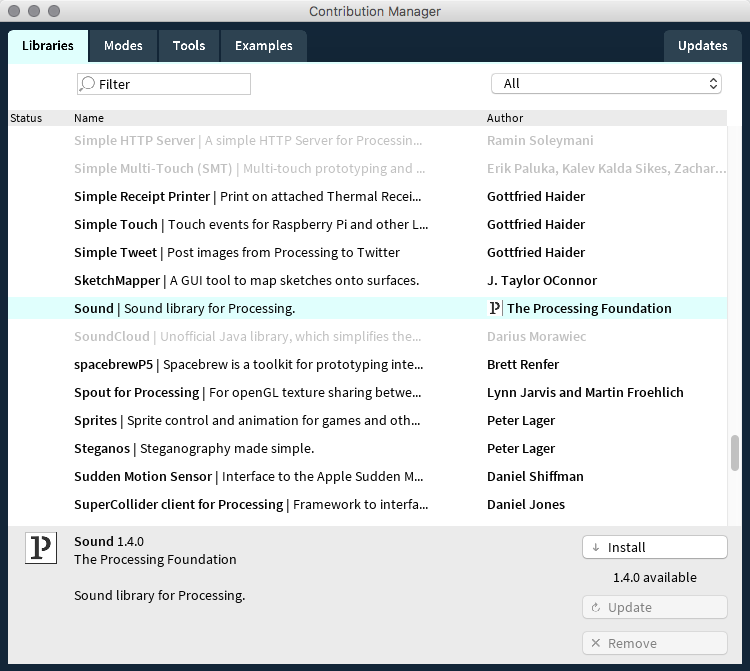
What it does do for us is show how a coding language can be extended and enhanced in its capabilities with the use of libraries, which we can import into the language by downloading the code from the web. You have to import the right stuff and put it in the right place for the Processing coding environment to make use of it. To get the library installed in Processing, in the PDE choose Menu > Sketch > Import Library... > Add Library to get this dialog:
Choose the Sound library and click the install button.
You should now see the library added to your Processing folder.
Let's Make Some Noise!
Of course, if we're going to play sounds we need some sound files. I've found that .aiff works most reliably with one gotcha: stereo sounds can mess things up, so you need to convert sounds to mono and to .aiff.
Make Sound Files
You can use any sound file you like, but first convert it to mono and .aiff. There's an excellent open source sound editor called Audacity, available at fosshub.com/Audacity.html. Audacity doesn't support .m4a files without a special extension, so I'll give you a working file for now.
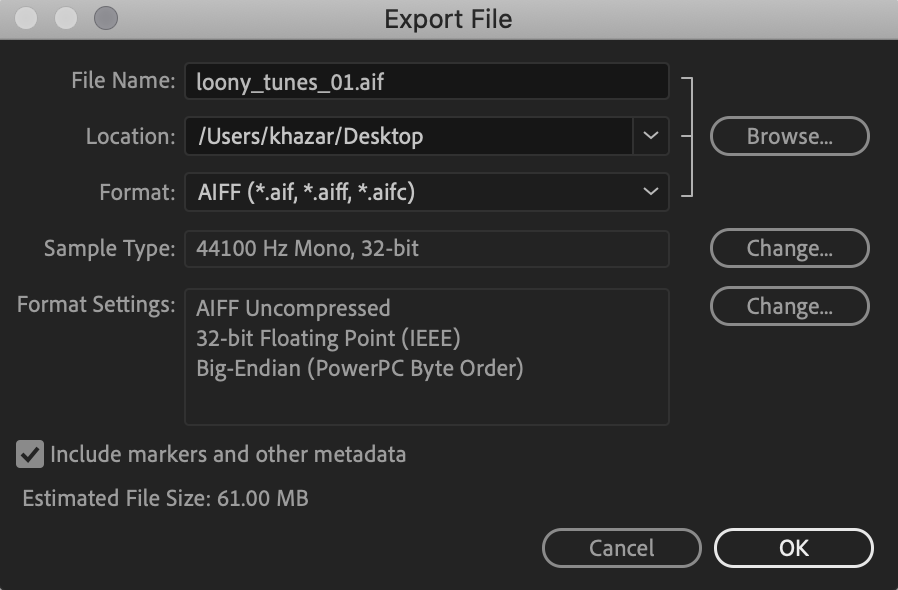
First we'll open it in Adobe Audition and edit it down to 19.783 seconds, then use Menu > Export > to export it as a mono .aiff file.
Then, in Processing, we'll make a new sketch, save it as playback01, and use Menu > Sketch > Add File... to import the sound into the data folder of the sketch (whew).
Creating a toggle variable to keep track of something
Using the sound object with:
soundFile() to store a sound file
soundFileVariable.rate(floatValue) to change the playback rate of the sound file
soundFileVariable.amp(floatValue) to change the volume of the sound file
soundFileVariable.loop() to loop the sound file continuously
soundFileVariable.stop() to stop the sound file's playback
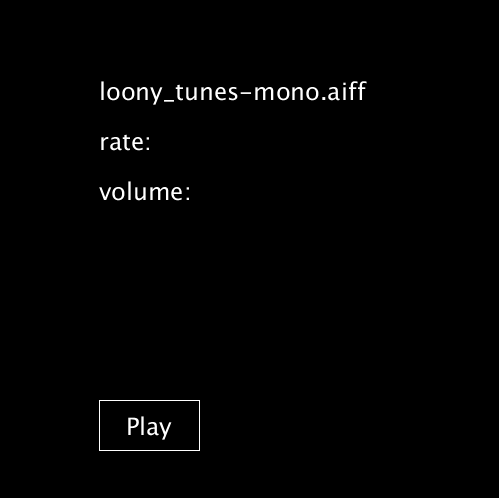
Some User Interface design with a button and text feedback
Using a mouseClick() function to trap user input
PROCESSING
Simple Sound Playback
// First, import the sound libraries// The asterisk makes sure you import all of the sound librariesimport processing.sound.*;
// Make a sound variable
SoundFile loonyTunes;
boolean soundOn = false;
voidsetup() {
size(500, 500);
// Load the loonyTunes variable with a sound// The sound has to be in the sketches data folder
loonyTunes = new SoundFile(this, "loony_tunes-mono.aiff");
}
voiddraw() {
background(0);
textSize(24);
textAlign(LEFT);
text("loony_tunes.aiff", 100, 100);
if (soundOn) {
// Map mouseX from 0.25 to 4.0 for playback rate. 1 equals original playback // speed 2 is an octave up 0.5 is an octave down.float myRate = map(mouseX, 0, width, 0.125, 5.0);
loonyTunes.rate(myRate);
text("rate: " + myRate, 100, 150);
// Map mouseY from 1.1 to 0.0 for amplitude float myAmp = map(mouseY, 0, width, 1.1, 0.0);
loonyTunes.amp(myAmp);
text("volume: " + myAmp, 100, 200);
} else {
text("rate: ", 100, 150);
text("volume: ", 100, 200);
}
// Draw and label buttonsnoFill();
stroke(255);
rect(100, 400, 100, 50);
textAlign(CENTER);
// Play/Stopif (soundOn) {
text("Stop", 150, 435);
} else {
text("Play", 150, 435);
}
}
voidmouseClicked() {
// Check for play/stop button if (mouseX > 100 && mouseX < 200 && mouseY > 400 && mouseY < 450) {
if (soundOn) { // Sound is not playing
loonyTunes.stop();
soundOn = false;
} else { // Sound is playing
loonyTunes.loop();
soundOn = true;
}
}
}
Sound Wave Generation
Processing can also be a digital synthesizer! Try this one:
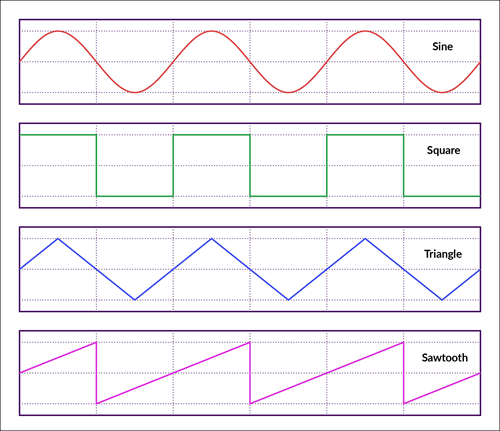
SinOsc object that generates sine waves
SqrOsc object that generates square waves
TriOsc object that generates triangle waves
SawOsc object that generates sawtooth waves
new SqrOsc(this) where the word this is required to pass a reference from the current object (in this case, setup()) into the sound object
waveformOscVariable.freq(floatValue) to pass a frequency value into the oscillator object
waveformOscVariable.pan(floatValue) to pan the stereo sound from left (-1) to right (1)
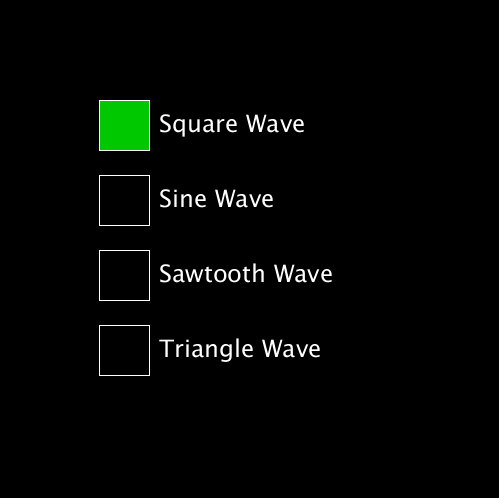
User Interface jiggery-pokery to make some rects act as buttons and status indicators
Using a switch/case statement to turn on a status indicator
PROCESSING
Waveform Synthesizer
import processing.sound.*;
// Set up four waveform oscillator variables
SqrOsc mySqr; // Square waves
SinOsc mySin; // Sin waves
SawOsc mySaw; // Sawtooth waves
TriOsc myTri; // Triangle waves// Track which oscillator is runningint whichOne = 0; // 0 means nobody's runningvoidsetup() {
size(500, 500);
stroke(255);
// Construct oscillators into the variables.
mySqr = new SqrOsc(this);
mySin = new SinOsc(this);
mySaw = new SawOsc(this);
myTri = new TriOsc(this);
}
voiddraw() {
background(0);
// Map mouseY from 20Hz to 1000Hz for frequency
mySqr.freq(map(mouseY, 0, height, 20.0, 1000.0));
mySin.freq(map(mouseY, 0, height, 20.0, 1000.0));
mySaw.freq(map(mouseY, 0, height, 20.0, 1000.0));
myTri.freq(map(mouseY, 0, height, 20.0, 1000.0));
// Map mouseX from left to right pan values
mySqr.pan(map(mouseX, 0, width, 1.0, -1.0));
mySin.pan(map(mouseX, 0, width, 1.0, -1.0));
mySaw.pan(map(mouseX, 0, width, 1.0, -1.0));
myTri.pan(map(mouseX, 0, width, 1.0, -1.0));
// Draw buttonsfill(0);
rect(100, 100, 50, 50);
rect(100, 175, 50, 50);
rect(100, 250, 50, 50);
rect(100, 325, 50, 50);
// Create UIcursor(ARROW);
fill(128);
if (mouseX > 100 && mouseX < 150) {
if (mouseY >100 && mouseY < 150) {
rect(100, 100, 50, 50);
cursor(HAND);
}
if (mouseY > 175 && mouseY < 225) {
rect(100, 175, 50, 50);
cursor(HAND);
}
if (mouseY > 250 && mouseY < 300) {
rect(100, 250, 50, 50);
cursor(HAND);
}
if (mouseY > 325 && mouseY < 375) {
rect(100, 325, 50, 50);
cursor(HAND);
}
}
// Show on statefill(0, 200, 0);
switch(whichOne) {
case 1 :
rect(100, 100, 50, 50);
break;
case 2 :
rect(100, 175, 50, 50);
break;
case 3 :
rect(100, 250, 50, 50);
break;
case 4 :
rect(100, 325, 50, 50);
break;
}
// Label buttonsfill(255);
textSize(24);
text("Square Wave", 160, 132);
text("Sine Wave", 160, 207);
text("Sawtooth Wave", 160, 282);
text("Triangle Wave", 160, 357);
}
voidmouseClicked() {
// Turn everybody off
mySqr.stop();
mySin.stop();
mySaw.stop();
myTri.stop();
whichOne = 0;
fill(255);
if (mouseX > 100 && mouseX < 150) {
if (mouseY >100 && mouseY < 150) {
mySqr.play();
whichOne = 1;
}
if (mouseY > 175 && mouseY < 225) {
mySin.play();
whichOne = 2;
}
if (mouseY > 250 && mouseY < 300) {
mySaw.play();
whichOne = 3;
}
if (mouseY > 325 && mouseY < 375) {
myTri.play();
whichOne = 4;
}
}
}
Better Sound with the minim Library
The Sound library is flakey, so let's use the minim library.
Audio File Download - don't forget to put it in the data folder in an already saved sketch.
PROCESSING
Play/Pause/Rewind with minim Sound
/*
Uses Minim library for its better AudioPlayer.
For more information about Minim and additional features,
visit http://code.compartmental.net/minim/
*/// Import the minim libraryimport ddf.minim.*;
// GLOBAL VARIABLES// Create a minim object variable
Minim minimObj;
// Create a minim player object variable
AudioPlayer playerObj;
voidsetup() {
size(500, 200);
// Put a new minim object into the minim object variable and// pass "this" into it so that it can load files from the
// data directory
minimObj = new Minim(this);
// Load the sound into the player object
playerObj = minimObj.loadFile("loony_tunes.mp4");
// Set a nice big text sizetextSize(24);
}
voiddraw() {
// Refresh the backgroundbackground(0);
noFill();
stroke(255);
rect(100, 60, 100, 50); // PLAY/PAUSE ButtontextAlign(CENTER);
// Toggle the text of the button base on whether the // music is playing or pausedif ( playerObj.isPlaying() ) { // It's playing, so show PAUSEtext("PAUSE", 150, 93);
} else { // It's not playing, so show PLAYtext("PLAY", 150, 93);
}
rect(300, 60, 100, 50); // REWIND buttontext("REWIND", 350, 93);
stroke(255);
}
voidmousePressed() {
// Check for PAUSE/PLAY buttonif(mouseX > 100 && mouseX < 20 && mouseY > 60 && mouseY < 110) {
// Toggle between playing and pausingif ( playerObj.isPlaying() ) {
playerObj.pause();
} else {
playerObj.play();
}
}
// Check for REWIND buttonif(mouseX > 300 && mouseX < 400 && mouseY > 60 && mouseY < 110) {
// If you don't pause it, it will start playing again if it was // already playing
playerObj.pause();
playerObj.rewind();
}
}
PROCESSING
minim Sound with Positional Feedback
/*
Uses Minim library for its better AudioPlayer.
For more information about Minim and additional features,
visit http://code.compartmental.net/minim/
*/// Import the minim libraryimport ddf.minim.*;
// GLOBAL VARIABLES// Create a minim object variable
Minim minimObj;
// Create a minim player object variable
AudioPlayer playerObj;
// Create a global variable for the playerObj position// so we can use it in draw and mousePressedfloat currentPlayerPosition;voidsetup() {
size(500, 200);
// Put a new minim object into the minim object variable and// pass "this" into it so that it can load files from the data
// directory
minimObj = new Minim(this);
// Load the sound into the player object
playerObj = minimObj.loadFile("loony_tunes.aiff");
// Set a nice big text sizetextSize(24);
}
voiddraw() {
// Refresh the backgroundbackground(0);
// Display the current position readouttextAlign(LEFT);
text(playerObj.position(), 30, 40);
// Draw a box around position indicatorrect(30, 140, 440, 20);
// Draw a 40x40 dot to show where in the song playback is
// currently located// And map it to the space inside the slider rectangle
currentPlayerPosition = map(playerObj.position(), 0, playerObj.length(), 40, width-30);
noStroke();
fill(255);
ellipse(currentPlayerPosition, 150, 20, 20);
// ButtonsnoFill();
stroke(255);
rect(100, 60, 100, 50); // PLAY/PAUSE ButtontextAlign(CENTER);
// Toggle the text of the button base on whether the // music is playing or pausedif ( playerObj.isPlaying() ) { // It's playing, so show PAUSEtext("PAUSE", 150, 93);
} else { // It's not playing, so show PLAYtext("PLAY", 150, 93);
}
rect(300, 60, 100, 50); // REWIND buttontext("REWIND", 350, 93);
stroke(255);
}
voidmousePressed() {
// Check for PAUSE/PLAY buttonif(mouseX > 100 && mouseX < 200 && mouseY > 60 && mouseY < 110) {
// Toggle between playing and pausingif ( playerObj.isPlaying() ) {
playerObj.pause();
} else {
playerObj.play();
}
}
// Check for REWIND buttonif(mouseX > 300 && mouseX < 400 && mouseY > 60 && mouseY < 110) {
// If you don't pause it, it will start playing again if it was // already playing
playerObj.pause();
playerObj.rewind();
}
}
And finally, let's add the capability to use the dot to control the position of the playback and add a better formatted readout
PROCESSING
Add a Robust Interface with Feedback and Control
/*
Uses Minim library for its better AudioPlayer.
For more information about Minim and additional features,
visit http://code.compartmental.net/minim/
*/// Import the minim libraryimport ddf.minim.*;
// GLOBAL VARIABLES// Create a minim object variable
Minim minimObj;
// Create a minim player object variable
AudioPlayer playerObj;
// Create a global variable for the playerObj position// so we can use it in draw and mousePressedfloat currentPlayerPosition;
// Create a variable to hold the a new position for the // playerObj, which will be used by playerObj.cue() to// set a new position. NOTE: For some reason, this has to// be an integer, cue() does not accept floats.int newPlayerPosition = 0;
// Create a toggle to determine if the slider control has// been hit by the mouseboolean sliderHit = false;voidsetup() {
size(500, 200);
// Put a new minim object into the minim object variable and// pass "this" into it so that it can load files from the data directory
minimObj = new Minim(this);
// Load the sound into the player object
playerObj = minimObj.loadFile("loony_tunes.aiff");
// Set a nice big text sizetextSize(24);
// Slow down the frameRate so it sounds better when dragging
// the conrol dotframeRate(12);
}
voiddraw() {
// Refresh the backgroundbackground(0);
// Display the current position readouttextAlign(LEFT);
// Set a varable to hold the number of second
// and two decimal places// The code below was found online in StarkOverflow.
// It is not documented by Processing.orgString postingPosition=String.format("%.2f",playerObj.position()*.001);
text(postingPosition, 30, 40);
// Draw a box around position indicatorrect(30, 140, 440, 20);
// Draw a 40x40 dot to show where in the song playback is currently located// And map it to the space inside the slider rectanglecurrentPlayerPosition = map(playerObj.position(), 0, playerObj.length(), 40, width-30);noStroke();
fill(255);
// Check to see if the slider was click on, set by
// the mousePressed tests belowif (sliderHit) {
// Make sure the mouse doesn't drag the slider dot doesn't go outside// the slider rectangleif(mouseX > 40 && mouseX < width-40){
ellipse(mouseX, 150, 20, 20);
sliderHit = true;
newPlayerPosition = int(map(mouseX, 40, width-40, 0, playerObj.length()));
playerObj.cue(newPlayerPosition);
} elseif (mouseX <= 40) { // If it does go outside,// pin it to the right edge...ellipse(40, 150, 20,20);
} elseif (mouseX >= width-40) { // ...or left edgeellipse(width-40, 150, 20,20);
}
} else { // If the mouse is released, set the slider dot // to the current player's positionellipse(currentPlayerPosition, 150, 20, 20);
}
// ButtonsnoFill();
stroke(255);
rect(100, 60, 100, 50); // PLAY/PAUSE ButtontextAlign(CENTER);
// Toggle the text of the button base on whether the // music is playing or pausedif ( playerObj.isPlaying() ) { // It's playing, so show PAUSEtext("PAUSE", 150, 93);
} else { // It's not playing, so show PLAYtext("PLAY", 150, 93);
}
rect(300, 60, 100, 50); // REWIND buttontext("REWIND", 350, 93);
stroke(255);
}
voidmousePressed() {
// Check for PAUSE/PLAY buttonif(mouseX > 100 && mouseX < 200 && mouseY > 60 && mouseY < 110) {
// Toggle between playing and pausingif ( playerObj.isPlaying() ) {
playerObj.pause();
} else {
playerObj.play();
}
}
// Check for REWIND buttonif(mouseX > 300 && mouseX < 400 && mouseY > 60 && mouseY < 110) {
// If you don't pause it, it will start playing again if it was // already playing
playerObj.pause();
playerObj.rewind();
}
// Check for slider dragif (mouseX > currentPlayerPosition - 10
&& mouseX < currentPlayerPosition + 10
&& mouseY > 140
&& mouseY < 160)
{
sliderHit = true;
}
}
voidmouseReleased() {
// Reset the sliderHit state. If you don't, it will never stop// updating the sound
sliderHit = false;
}