Draw A Heart
Or using Bezier Curves...
Processing can draw curves, but you really have to work out the image on graph paper, or like here, in Illustrator on a grid, then work out the x,y locations for each of the anchor points and control points. Like this:
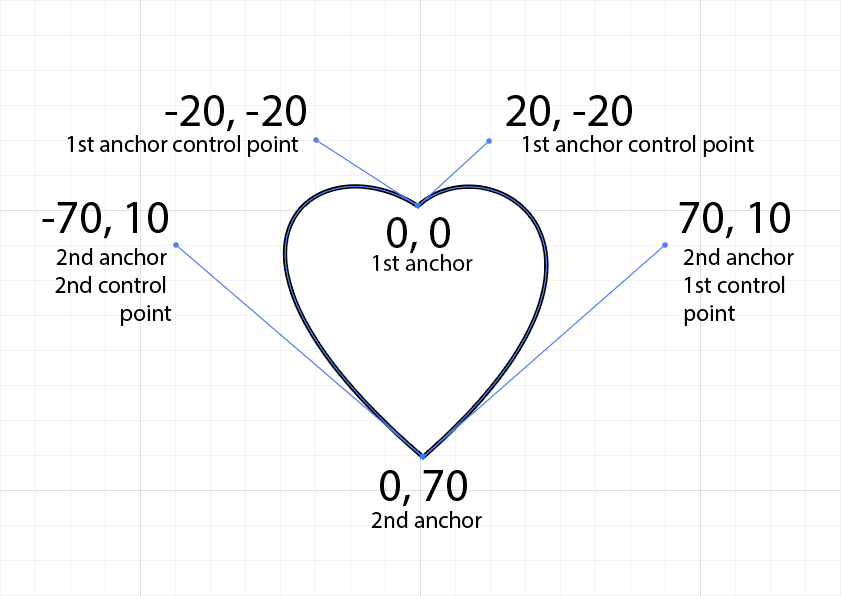
It's very unintuitive.
You start by creating a shape with beginShape()/endShape(), then putting the xy coordinates of anchor and control points associated with Bezier curves into a hierarchy of vertex() and bezierVertex() assignments.
Below is some pseudo code that generalizes the procedure. The docs at Processing/Reference are pretty bad.
// Start with beginShape
  beginShape();
    // Plot the 1st anchor with vertex()
    vertex(anchor1x, anchor1y);
    // Plot the 1st anchor control point,
    // 2nd anchor control point, and 2nd anchor
    bezierVertex(control1x, control1y,
                 control2x, control2y,
                 anchor2x, anchor2y);
    // Plot the Nth anchor control point,
    // Nth+1 anchor control point, and Nth+1 anchor
    bezierVertex(controlNx, controlNy,
                 controlN+1x, controlN+1y,
                 anchorN+1x, anchorN+1y);
    // Do as many sets of points as necessary,
    // but the last one has to have the first anchor xy postion
    // as the last set of points
    bezierVertex(lastAnchorControlX, lastAnchorControlY,
                 1stAnchor2ndControlX, 1stAncho2ndControlY,
                 1stAnchorX, 1stAnchorY);
  // End with endShape
  endShape();
}
Below is a very simple heart shape using the technique:
PROCESSING
Draw A Heart
void setup() {
  size(200, 200);
}

void draw() {
  // Position the heart in the middle of the window
  translate(width/2, height/2-35);
  noStroke();     // Turn off the stroke
  fill(255,0,0);  // Fill it with red
  // Use the Bezier functions to draw the heart
  // See the image of a heart I drew in Illustrator
  // to figure out the x,y points
  beginShape();
    vertex(0, 0);
    bezierVertex(20, -20, 70, 10, 0, 60);
    bezierVertex(-70, 10, -20, -20, 0, 0);
  endShape();
}
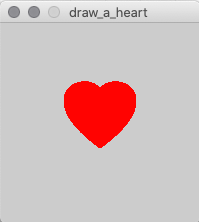
Result